
Last updated: November 2026 · Category: Design
Short answer: Use Canva if you need marketing graphics, social posts, presentations and print materials quickly, especially if you are not a trained designer. Use Figma if you design websites, apps, user interfaces or design systems with a product team. Many businesses use both: Figma for the product, Canva for marketing.
Canva vs Figma at a Glance
| Canva | Figma | |
|---|---|---|
| Best for | Marketing graphics, social media, presentations, print, short video | UI/UX design, prototyping, design systems, developer handoff |
| Learning curve | Very easy | Moderate to steep |
| Free plan | Yes | Yes (Starter, limited files) |
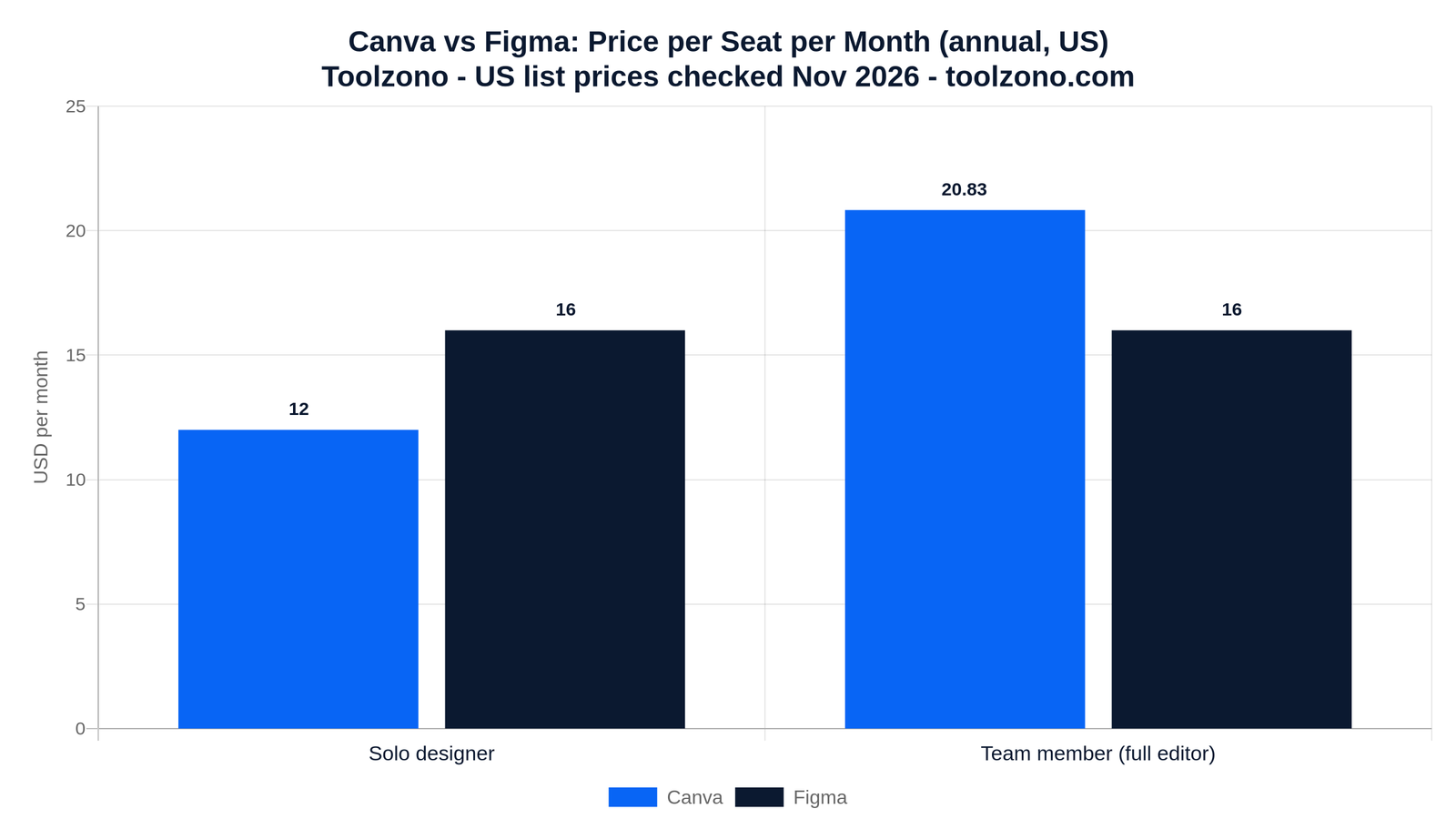
| Entry paid price | Pro: $144/year for one person | Professional: about $16/month per Full seat (annual); cheaper Dev and Collab seats |
| Team pricing | Business: $250 per person/year | Per seat by seat type; Organization and Enterprise tiers |
| Templates | Huge library for every format | Community files and UI kits |
| Prototyping | No | Yes, interactive prototypes |
| Developer handoff | No | Yes (Dev Mode) |
| AI features | Magic Studio (images, copy, resize, edits) | Figma AI and Figma Make (design and prototype generation), credit-based |
US list prices as of November 2026. Confirm on Canva’s pricing page and Figma’s pricing page.
Ease of Use
Canva is built for people without design training. You start from a template, replace text and images, and export. Figma is a professional design tool with frames, auto layout, components, variants and constraints, which are powerful but take time to learn.
Winner: Canva.
Design Capabilities
Figma gives precise control over layout, vector shapes, typography and reusable components, which is essential for interface design and large design systems. Canva covers most marketing needs but is not intended for pixel-perfect product design.
Winner: Figma.
Templates and Content Library
Canva’s library of templates, stock photos, video, audio and graphics is one of its biggest advantages. Figma’s community offers excellent UI kits, wireframes and plugins, but far fewer ready-made marketing templates.
Winner: Canva.
Collaboration
Both support real-time collaboration and comments. Figma’s collaboration is built around product workflows: design reviews, branching on higher plans, FigJam whiteboards and Dev Mode for engineers. Canva Business focuses on brand consistency with shared brand kits and approval workflows.
Winner: Figma for product teams; Canva for marketing teams.
AI Features
Canva’s Magic Studio covers practical marketing tasks: generate images, remove backgrounds, expand photos, resize designs for every channel and write copy. Figma’s AI helps generate and edit interface designs, and Figma Make turns prompts into working prototypes. Both meter AI usage by plan.
Winner: depends on use case.
Pricing
For one person, Canva Pro ($144/year) is cheaper than a Figma Professional Full seat. Figma becomes cost-effective for product teams because non-designers can use lower-cost Collab or Dev seats. Canva Business is priced per person with no volume discount until Enterprise.
Winner: Canva for solo users and marketing teams.
Which Should You Choose?
| If you… | Choose |
|---|---|
| Create social media posts, ads and flyers | Canva |
| Make presentations and pitch decks quickly | Canva |
| Design a mobile app or SaaS dashboard | Figma |
| Hand designs off to developers | Figma |
| Build and maintain a design system | Figma |
| Are a small business owner with no design experience | Canva |
Final Verdict
Canva and Figma solve different problems. Canva is the best tool for fast, on-brand marketing content created by anyone. Figma is the industry standard for interface and product design. Pick the one that matches the work you do most, and add the other only when a real need appears.
Read our full Canva review or browse the best design tools for small business.
Frequently Asked Questions
Can Canva replace Figma?
Not for UI/UX design. Canva cannot create interactive prototypes, components or developer handoff specs.
Can Figma replace Canva?
Technically you can create marketing graphics in Figma, but it is slower without Canva’s template and stock library, and it is harder for non-designers.
Is Figma free?
Figma has a free Starter plan with a limited number of design files. Paid seats start with low-cost Collab seats and go up to Full seats for designers.
Which is better for beginners?
Canva. Beginners can produce professional-looking designs within minutes.
Which is cheaper?
For one user, Canva Pro is usually cheaper. For product teams with many non-designer collaborators, Figma’s cheaper seat types can make it cost-effective.