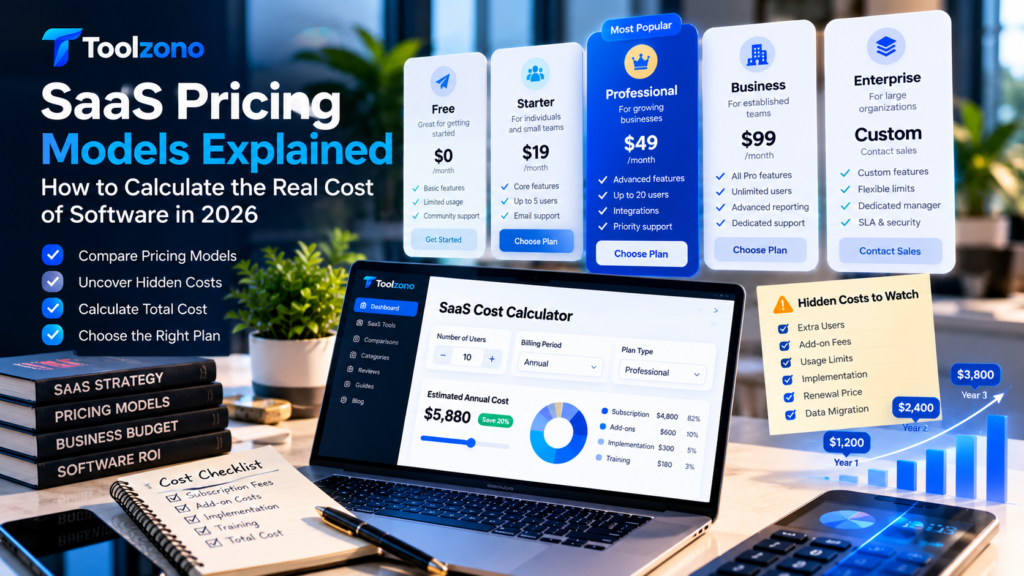
SaaS Pricing Models Explained: How to Calculate the Real Cost of Software
SaaS pricing determines how much you pay, how costs change as your business grows, and which features you can access. The cheapest advertised plan is not always the most affordable option once you include extra users, usage limits, implementation, and renewals.
A practical guide for U.S. small businesses, startups, and software buyers.
Software-as-a-service (SaaS) products are commonly sold through subscriptions, usage-based charges, or combinations of the two. Some vendors charge per user; others charge by transaction volume, storage, contacts, projects, or API usage.
Understanding these models helps you predict expenses, avoid unexpected overages, and choose a plan that fits your current needs without creating unnecessary costs as your company grows.
1. What Is a SaaS Pricing Model?
A SaaS pricing model defines how a software provider charges customers for access to its product. It determines the billing unit, available plans, included features, usage limits, and potential additional fees.
Two products with similar advertised monthly prices can have very different total costs. One might include unlimited projects but charge for each user. Another might include several users but impose strict limits on storage, automation, or monthly activity.
Before comparing prices, identify exactly what you are purchasing: the plan, the number of users, the billing period, the included allowance, and the rules for additional usage.
2. The Main SaaS Pricing Models Compared
| Pricing model | How it works | Best suited to | Main risk |
|---|---|---|---|
| Flat-rate | One fixed price for a defined package. | Simple, predictable workflows. | You may pay for unused capabilities or outgrow the package. |
| Per-user | Price increases with the number of licensed users. | Team collaboration and role-based access. | Adding employees or contractors increases recurring costs. |
| Tiered | Different plans include different features or limits. | Businesses with distinct needs or growth stages. | Essential features may require a more expensive tier. |
| Usage-based | Charges depend on measured consumption. | Variable workloads and metered services. | Usage spikes can make bills unpredictable. |
| Freemium | A limited free plan sits alongside paid options. | Testing products or handling simple workflows. | Limits may force an upgrade as needs change. |
| Hybrid | A base subscription is combined with usage or add-on charges. | Businesses needing a core platform and variable capacity. | Multiple billing components are harder to forecast. |
These models are not mutually exclusive. A vendor may offer tiered plans with per-user pricing and additional charges for usage beyond a monthly allowance.
3. How to Compare SaaS Pricing Models in Practice
Per-user pricing: calculate your actual team size
Per-user pricing is straightforward when your team size is stable. However, a plan that looks affordable for two employees may become expensive when you add sales staff, contractors, or additional departments.
Formula: Monthly license cost = price per user × number of billable users.
For example, 8 users at an illustrative $25 per user per month cost $200 monthly, or $2,400 over 12 months, before taxes, add-ons, or other fees.
Tiered pricing: compare features, not plan names
Vendors may label plans Starter, Professional, Business, or Enterprise. These labels are not standardized. Compare the actual limits and capabilities instead.
- Which essential features are included?
- How many users, projects, contacts, or records are allowed?
- Are integrations, reporting, and automation restricted?
- Does the next tier provide something your business genuinely needs?
Do not pay for an upgrade solely because it is marketed as the recommended plan. Match the plan to documented requirements.
Usage-based pricing: model low, expected, and high usage
Usage-based pricing can suit businesses whose activity fluctuates. However, the cost depends on the provider's billing unit and measurement rules. Charges might be based on API requests, processing volume, messages, contacts, storage, or other consumption.
Estimate your expected usage and examine a high-demand scenario. Confirm whether the service provides usage alerts, spending caps, rate limits, and detailed billing reports. These controls vary by vendor.
Freemium pricing: test the limits before adopting it
A free plan can be useful for validating a workflow without an upfront subscription. Before building a process around it, check user limits, branding restrictions, export options, storage, support, and access to essential integrations.
Also confirm whether the free plan is intended for commercial use and whether its terms permit your planned use case.
4. Calculate the True First-Year Software Cost
Subscription price is only one component of the total cost of ownership. A more reliable estimate accounts for the full cost of adopting and operating the product.
Subscription fees + setup and migration + required add-ons + training and administration + applicable taxes and other mandatory fees.
Check these cost categories before choosing a plan:
- Monthly or annual subscription charges.
- Additional user seats and guest-access restrictions.
- Usage overages, credits, API calls, or processing fees.
- Premium integrations, storage, reporting, or automation.
- Implementation, migration, configuration, and training.
- Renewal price, contract duration, and cancellation conditions.
- Time required to administer the product and maintain workflows.
- Costs of exporting data or moving to another provider.
5. Worked Example: Compare Two Software Plans
Consider a hypothetical business comparing two project-management subscriptions for a team of 10 people. The figures below are illustrative and are not prices quoted by real vendors.
| Cost component | Plan A | Plan B |
|---|---|---|
| Monthly subscription | $120 | $160 |
| Annual subscription | $1,440 | $1,920 |
| One-time setup and migration | $200 | $100 |
| Required annual add-ons | $240 | $0 |
| First-year total | $1,880 | $2,020 |
| Average monthly equivalent, first year | $156.67 | $168.33 |
Plan A has the lower first-year cost by $140 under these assumptions. However, cost alone does not establish which product is better. If Plan B includes a required security control or saves substantial staff time, the higher price might be justified.
Compare equivalent capabilities and include all required fees before drawing a conclusion. For renewals, remove one-time setup expenses and recalculate recurring costs using the applicable renewal terms.
6. Calculate the Cost of Scaling Your Software
Your software bill can change as the business grows. More employees, customers, records, transactions, or automated tasks may move you into a higher pricing tier or trigger additional usage fees.
Model at least three scenarios:
- Current: Your present team size and normal usage.
- Expected growth: Your realistic forecast for the next year.
- High usage: A plausible busy period or faster-than-expected expansion.
For each scenario, estimate the total annual cost and identify the threshold at which you would need another plan. For usage-based products, use the provider's actual billing unit and rate schedule rather than assuming that cost rises linearly.
7. Watch for Hidden Software Costs
Annual billing and renewal changes
Annual plans may reduce the effective monthly price, but they can require a larger upfront payment. Check the renewal amount, notice period, refund terms, and whether the discount applies only to the first term.
Feature and usage restrictions
A low-cost tier may restrict exports, automation, reporting, integrations, history, or user permissions. If a restriction blocks an essential task, the entry-level plan may not be a viable comparison.
Implementation and migration
Moving data, rebuilding workflows, configuring permissions, and training employees all consume time. Estimate these costs before switching tools, especially if the existing platform contains important business records.
Administrative overhead
Multiple subscriptions can create duplicated data, extra logins, separate invoices, and more vendor-management work. Evaluate whether consolidating tools would reduce complexity without sacrificing necessary functionality.
8. Use a Simple SaaS Budgeting Framework
A software budget should distinguish recurring charges from one-time expenses and separate committed costs from variable usage.
| Budget line | How to estimate it |
|---|---|
| Core subscriptions | Sum the recurring base fees for all selected products. |
| Seats and add-ons | Calculate the required licenses and paid extensions. |
| Variable usage | Estimate expected consumption and a realistic high-use scenario. |
| Implementation | Include setup, migration, configuration, and training. |
| Contingency | Set a business-appropriate allowance for uncertain costs. |
Review actual invoices against the budget monthly. Investigate unused seats, unexpected usage, duplicate products, and approaching renewals. Assign an owner to each subscription so that a tool is not renewed automatically without a usage and value review.
9. Questions to Ask a SaaS Vendor Before Buying
- What is included in the quoted plan and what costs extra?
- How are additional users and usage charged?
- What happens when usage exceeds the included allowance?
- What will the renewal cost, and when can pricing change?
- Are annual subscriptions refundable or cancellable mid-term?
- Which integrations require a higher tier or third-party service?
- Can we export our data in a usable format?
- What support is included and what are the response commitments?
- Are security features and administrative controls available on this plan?
Save the pricing page, plan details, and relevant contract terms at the time of purchase. Vendor offers and plan features can change, so confirm the current terms before committing.
10. A Practical SaaS Pricing Decision Checklist
- The pricing model matches the way we use the product.
- The chosen plan includes every essential feature.
- First-year and recurring costs have been calculated separately.
- Additional seats, add-ons, and usage charges are understood.
- Expected growth and high-usage scenarios have been considered.
- Setup, migration, training, and administration are budgeted.
- Renewal, cancellation, and data-export terms have been checked.
- The product's expected business value justifies its total cost.
- A subscription owner and renewal-review date have been assigned.
Choose Software With More Confidence
Toolzono helps business owners research software, compare products, understand buying decisions, and discover practical tools for business workflows.
Explore Toolzono →Frequently Asked Questions
What is the most common SaaS pricing model?
Subscription pricing is widely used, with charges commonly based on users, tiers, or a fixed package. Many products combine subscriptions with usage-based fees or paid add-ons. The exact model varies by product.
Is per-user pricing better than usage-based pricing?
Neither is universally better. Per-user pricing can be predictable when team size is stable. Usage-based pricing can align costs with consumption but requires monitoring variable usage and potential overages. Compare both against your actual workload.
How do I calculate the total cost of SaaS?
Add the subscription fees, required seats and add-ons, implementation, migration, training, administration, and other applicable charges. Calculate first-year costs separately from recurring renewal costs.
Are annual SaaS subscriptions always cheaper?
Not necessarily. An annual plan may have a lower effective monthly rate, but it can require upfront payment and reduce flexibility. Compare the actual contract price, cancellation terms, and expected usage before choosing a billing period.
What are hidden SaaS costs?
Potential additional costs include extra user seats, usage overages, premium integrations, storage, implementation, migration, training, administration, and renewal price changes. Which costs apply depends on the vendor and subscription terms.
How often should a business review its SaaS subscriptions?
Review usage and invoices regularly, such as monthly, and conduct a more complete review before renewals. Check whether each tool remains necessary, is being used, meets requirements, and provides enough value to justify its cost.
Final Takeaway
The right SaaS pricing model is the one that matches your workflow, makes costs reasonably predictable, and delivers value at your actual usage level. A low advertised price is not enough if essential features, extra seats, or usage charges increase the total.
Compare equivalent plans, calculate the full cost, model future usage, and review contract terms before purchasing. Reassess your subscriptions regularly so your software budget reflects the needs of your business.
Visit Toolzono for more practical software buying guides and business technology insights.

Pingback: 7 Best Email Marketing Software for Small Business (2026) - Toolzono